Computers for Seniors
SUMMARY:
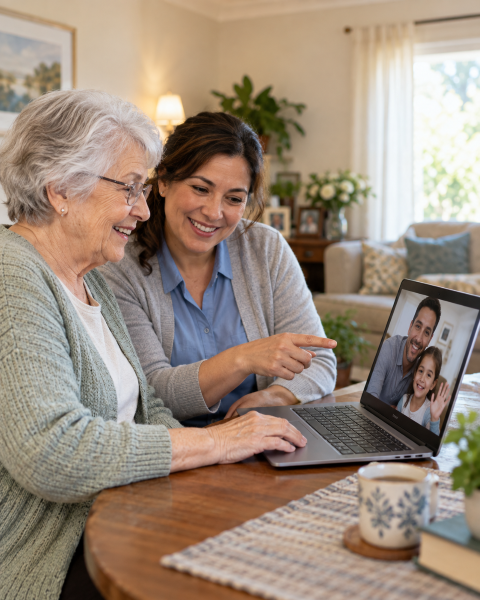
Technology isn't just for young people—it's essential for staying independent, connected, and in control of your life. But if you didn't grow up with computers, it can feel overwhelming. The good news: you don't need to become a tech expert. You just need to start small, practice with patience, and give yourself grace. Familiar Surroundings Home Care staff can help you start your technology journey. Call us today!
FAMILIAR SURROUNDINGS HOMECARE SERVICE AREA
Our in-home technology lessons for seniors are available across the Bay Area, including in Santa Clara, Santa Cruz, San Mateo, and Alameda Counties.
Is it too late to learn technology if I've never used a computer?
Quick Answer: No. Age is not a barrier. Starting simple and building confidence is all it takes.
Expert Recap: Thousands of seniors with no prior tech experience are learning every day. The key is starting with ONE skill, practicing regularly, and celebrating small wins. Your brain is absolutely capable of learning new technology—at your pace.
How do I keep my information safe online?
Quick Answer: Strong passwords, skepticism about unsolicited requests, and regular updates protect you from most threats.
Expert Recap: You don't need to be paranoid—just thoughtful. Real companies won't ask for passwords via email. Unknown callers claiming to be from your bank are scams. When in doubt, hang up and call the official number yourself.
Our Approach
We understand that technology can feel intimidating—but it's also essential to staying independent, connected, and engaged. Familiar Surroundings Home Care offers in-home technology lessons tailored to your pace and interests. Our trained staff visit you personally to help with computers, email, internet browsing, video calls, and more. Because staying connected is part of staying independent.
Why Technology Matters Now
Technology isn't just about gadgets. It's about staying independent, connected, and in control. It lets you:
- Video call a grandchild or other family member.
- Message your doctor instead of waiting on hold
- Check your bank balance anytime
- Look up health information instantly
- Join communities around your interests
- Stay engaged and mentally active
For many seniors, technology is the difference between isolation and connection, between uncertainty and information.
The Beginner's Mindset
Three Things to Remember:
- You Won't Break It: You cannot break your device by clicking the wrong button. Every tech expert in the world has made "mistakes." It's how everyone learns.
- Slow and Steady Wins: Pick ONE skill. Master it. Then move to the next. Trying to learn five things at once is overwhelming.
- Your Pace is the Right Pace: There's no "too slow." If you need to practice something ten times, that's perfect. Learning looks different for everyone.
Essential Skills for Staying Connected
Staying Safe Online
Password Protection
- Use strong passwords (mix uppercase, lowercase, numbers, symbols)
- Don't use birthdates, pet names, or common words
- Use different passwords for important accounts
- Change passwords every few months
- Write them down in a secure place
Spotting Scams
Red flags: Unsolicited calls or emails asking for personal information, offers that sound too good to be true, pressure to act immediately, requests for payment via gift card, links in unexpected emails.
What to do: Hang up and call the official phone number yourself, don't click links from unknown senders, ask a trusted family member when in doubt, report suspicious emails.
Real companies (banks, Medicare, IRS, Amazon) will NEVER ask for passwords or sensitive info via email or unexpected calls.
Keeping Your Device Healthy
- Allow updates when prompted (they fix security problems)
- Use built-in antivirus (Windows Defender on PC, Mac Security on Mac)
- Don't download files from untrusted websites
- Be cautious of email attachments from unknown people
Protecting Your Privacy
- Think before you share personal information online
- Check privacy settings on social media
- Don't post information that could be used for identity theft
- Be skeptical of "quizzes" and games that ask personal questions
Tools That Make Life Easier
Devices
- Smartphone or Tablet: Easier to use than a big computer. Larger screens, familiar apps, always with you.
- Voice Assistant (Alexa, Google Home): Ask questions, set reminders, play music, control smart home devices—hands-free.
- Smart Watch: Tracks activity, reminds you of medications, can help if you fall.
Helpful Apps & Services
- Video: FaceTime, Zoom, WhatsApp
- Messaging: iMessage, WhatsApp, Facebook Messenger
- Health: Your doctor's patient portal app
- Medication: Pill reminder apps (Medisafe, Pillboxie)
- Safety: Life alert apps, emergency contact apps
- Entertainment: Netflix, Audible (audiobooks), Kindle
- News & Information: Your favorite newspaper apps
Start Today
You don't need to master technology. You just need to start. We can help! Familiar Surroundings Home Care offers personalized in-home technology lessons. One of our trained staff will visit you to help with computers, email, video calling, internet browsing, and more—at your pace, in your home.
Schedule Your Free In-Home Assessment Today »
Our In-Home Technology Lessons Include
- Computer Basics: Turning devices on/off, navigating mouse & keyboard, understanding basic device settings.
- Internet Skills: Browsing safely online, recognizing ads & avoiding scams, opening and switching between tabs.
- Email & Video Calling: Setting up and managing email accounts, sending, replying, forwarding messages, video calling family, friends, or telehealth appointments.
- File Organization: Creating, saving, & organizing files & folders, personalizing your computer for ease of use.
Why Seniors Love Our Lessons: Gentle, patient, one-on-one instruction. Fully customized to your pace and interests. Helps build independence and confidence. Provided by staff you already know and trust.
Or call us directly:
Santa Clara: (408) 979-9990
San Mateo: (650) 353-9777
Santa Cruz: (831) 480-3990
Alameda: (510) 292-4010
OTHER SERVICES WE OFFER
IN SANTA CLARA, SANTA CRUZ, SAN MATEO, OR ALAMEDA COUNTIES



In-home respite care provides a break, or "time-out" for family caregivers when you need to take some time for yourself. For more information on what will work best for your family, please contact us.
« Back to Client Services